
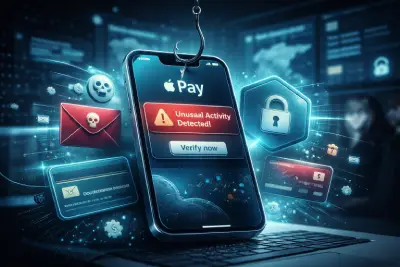
Global Phishing Campaign Targets Apple Pay Users with Fake Security Alerts
-
Feb, 05, 2026
Global Phishing Campaign Targets Apple Pay Users with Fake Security Alerts
Global Phishing Campaign Targets Apple Pay Users with Fake Security Alerts
A new wave of phishing attacks has recently targeted Apple Pay users worldwide, using carefully crafted fake alerts to steal sensitive financial information. According to multiple tech reports, the campaign relies on fear-based messaging that convinces victims their accounts are under immediate threat.
Fake alerts designed to look official
Technology monitoring platforms report that many Apple users received messages that closely imitate official company communications. These messages feature Apple logos, reference numbers, and professional formatting, claiming that large suspicious transactions were blocked for security reasons.
Recipients are instructed to call a phone number to “verify” the issue. In reality, the number connects directly to scammers. Once on the call, victims are pressured into revealing Apple ID credentials, verification codes, or payment details.
Security experts emphasize that Apple does not contact users in this manner. If a transaction appears suspicious, the card-issuing bank — not Apple — is responsible for contacting the customer. Banks typically block questionable transactions automatically and only require confirmation to approve them, not to cancel them.
Warning signs of phishing messages
Fraud analysts note that phishing attempts often contain subtle spelling mistakes, unusual sender domains, or formatting inconsistencies. Another red flag is urgency: scammers try to rush victims into acting before they have time to think. Legitimate companies rarely demand immediate action through threatening language.
Users are advised never to click unknown links or call unverified numbers. Suspicious messages should be deleted immediately. As a precaution, checking purchase history through official Apple settings or the company’s website can help confirm whether any real activity occurred. Changing account passwords and enabling additional security features is also recommended.
Simple steps to strengthen account security
Experts stress the importance of communicating only through official Apple or bank channels and ignoring any request for confidential information. Phishing tactics continue to evolve, becoming more convincing each year. Awareness and skepticism remain the strongest defenses.
In an increasingly digital ecosystem — stretching from Arabic websites and specialized blogs, alongside insights drawn from Egypt-based online stores, Kuwait stores, and vitamin e-commerce platforms. personal account security is no longer optional. A single careless interaction can escalate into serious financial loss.
The safest approach is consistent vigilance. Scammers rely on moments of panic and distraction, while informed users can shut down attacks simply by pausing, verifying, and refusing to engage with suspicious communication.
Other Topics You May Also Be Interested In
NVIDIA Unveils Earth-2: A New Era of AI-Powered Weather Forecasting
Apple Unveils the New AirTag with Longer Range, Louder Sound, and Smarter Tracking
UK Leads Major Economies Most Affected by AI as Job Opportunities Decline
How to Stay Productive While Working From Home: A Practical Guide for Remote Workers
Study Reveals Growing Shift Toward Outsourced and Hybrid Security Operations Centers in the UAE
Public Wi-Fi Security Risks: 7 Hidden Threats and How to Protect Yourself
Social Engineering: How Dangerous Is It and How Can You Protect Yourself?
How Artificial Intelligence Will Reshape Banking in 2026: 13 Key Trends to Watch
Apple Announces Siri Update Powered by Google’s Gemini AI
Artificial Intelligence and the Future of Work: Between Innovation, Jobs, and Social Acceptance
The Internet of Things (IoT) and the Future of Cybersecurity
UAE Experts Program Opens Applications for Artificial Intelligence Track in January 2026
Kaspersky Warns of Sophisticated Phishing Campaign Exploiting OpenAI Team Invitations
Saudi Arabia Accelerates AI Infrastructure as Humain Secures $1.2 Billion Financing Deal
Understanding DDoS Attacks: How They Work and How to Mitigate Them
The Fifth Wave of Cybercrime: How AI Has Turned Digital Crime into a Global Industry